Any web page or HTML to a clean PDF
Paste a URL or send your HTML and get a PDF printed by real Chrome: A4 or Letter, margins, backgrounds and page numbers. For invoices, reports, receipts and saving pages. Free, no key.
Who it's for
Anyone who needs a PDF of a page or a template, from one click to an automated invoice run.
POST your HTML template, get a print-ready PDF with backgrounds and page numbers.
Turn an article, docs page or dashboard into an A4 or Letter PDF.
One GET URL returns the PDF file, so it drops into Make, Zapier, n8n or a curl line.
An MCP tool that returns the PDF as base64 plus its page count and size.
Try it
Enter a web page. Printwren prints it with real Chrome; click the result to download the PDF.
Raw JSON response
Real sample output
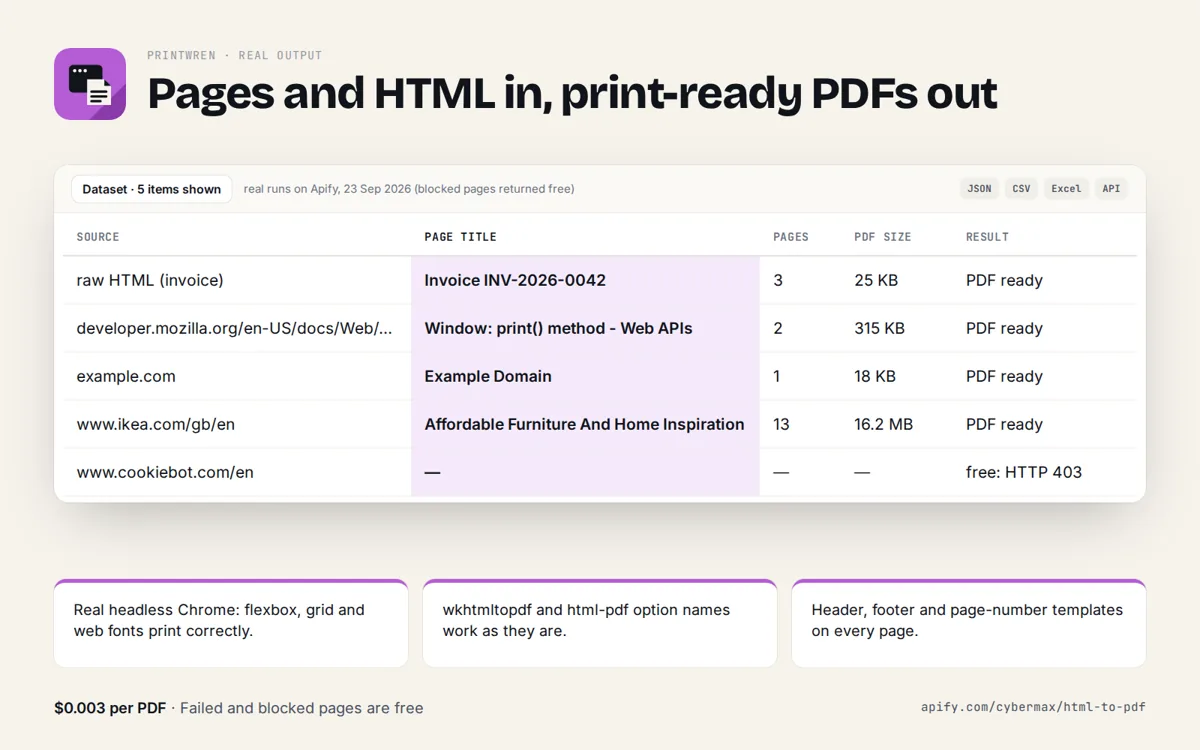
Captured from a live call to this API.
{
  "results": [
    {
      "source": "https://developer.mozilla.org/en-US/docs/Web/CSS/@page",
      "status": "ok",
      "title": "@page CSS at-rule - CSS | MDN",
      "pages": 9,
      "bytes": 1517607,
      "format": "A4",
      "landscape": false,
      "renderMs": 4568,
      "downloadUrl": "https://printwren.cybermax-tools.workers.dev/pdf?url=https%3A%2F%2Fdeveloper.mozilla.org%2Fen-US%2Fdocs%2FWeb%2FCSS%2F%40page&format=A4&pageNumbers=true",
      "renderedAt": "2026-09-26T00:31:08.019Z"
    }
  ],
  "count": 1
}
Limits, plainly
Free and rate limited so it stays fast for everyone. A bulk version (many URLs per run, custom headers and footers, waits for selectors, cookie-banner dismissal) is coming to the Apify Store.
- 4 PDFs per minute per IP address, one document per call.
- HTML up to 200 KB; public http(s) pages only.
- About 25 seconds per document at most.
- Shared free renderer: 15 free PDFs a day across all free users; paid keys keep priority. If it is busy you get a clear 503.
- Free tier: 20 PDFs a day per IP, no key; paid API keys from $9/month. Nothing is stored: the PDF is made on each call.
Get an API key
Real-Chrome HTML and URL to PDF for invoices, reports and receipts, from code, no-code tools or AI agents. Keys work on the REST API and the MCP server.
14-day money-back promise: if it doesn't work as described, email us within 14 days and we fix it or refund you in full. Refund terms.
3,000 PDFs a month · 20 per minute
Get Growth keyor $240/year, 2 months freePay with card, Apple Pay or Google Pay through Polar (merchant of record, sales tax/VAT handled). Your key appears right after checkout and in your email; manage or cancel any time in the customer portal. Send it as x-api-key: YOUR_KEY (or Authorization: Bearer YOUR_KEY, which MCP clients support). Check usage at /key. Failed calls are not counted. HTML-to-PDF APIs start at $9 a month: PDFShift $9 for 500 and $24 for 2,500, html2pdf.app $9 for 1,000, DocRaptor $15 for 125 (median about $18 per 1,000, checked 27 Sep 2026). Printwren is $9 for 750 and $24 for 3,000 real-Chrome PDFs, or a $10 pack of 1,000 that never expires.
curl -s "https://printwren.cybermax-tools.workers.dev/api/pdf?..." -H "x-api-key: YOUR_KEY"

# MCP (Claude Desktop, Cursor, VS Code)
{ "mcpServers": { "printwren": { "type": "http", "url": "https://printwren.cybermax-tools.workers.dev/mcp",
  "headers": { "Authorization": "Bearer YOUR_KEY" } } } }

# Usage so far
curl -s https://printwren.cybermax-tools.workers.dev/key -H "x-api-key: YOUR_KEY"
Use the API
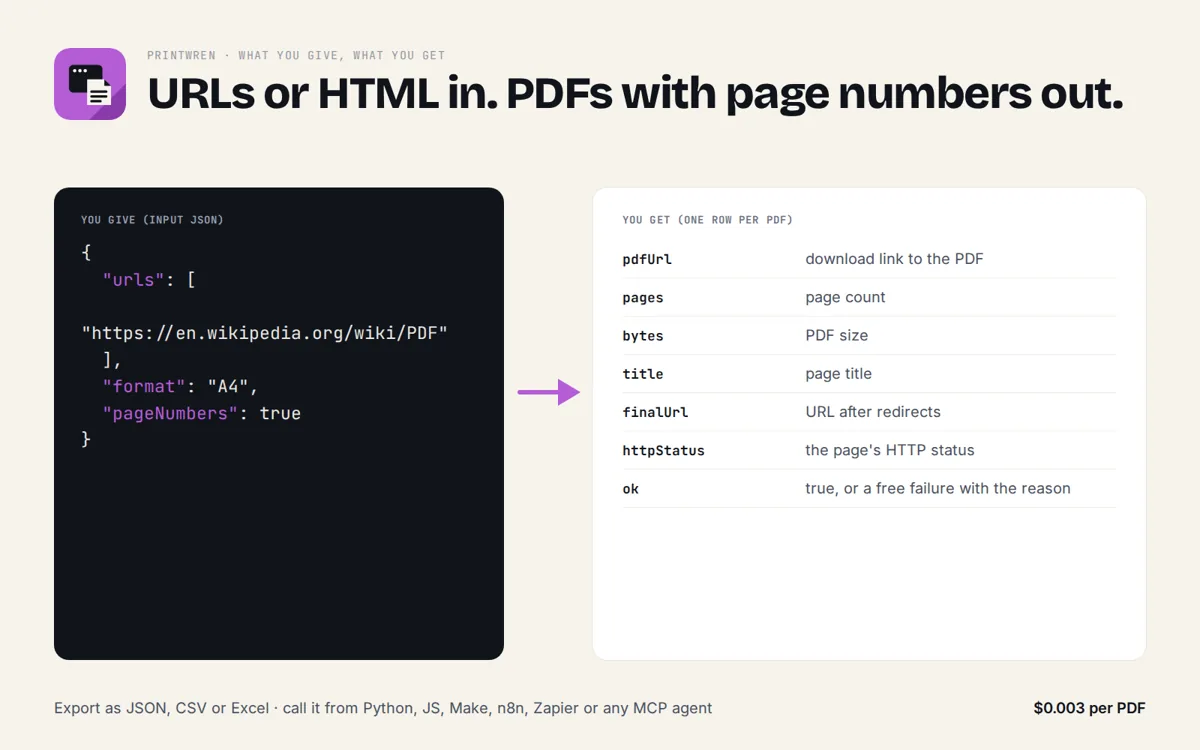
JSON over HTTPS, CORS enabled, no key. GET for quick calls, POST a JSON body for lists. Spec: openapi.json · llms.txt
curl -s "https://printwren.cybermax-tools.workers.dev/api/pdf?url=example.com&format=A4&pageNumbers=false"

# lists: POST a JSON body
curl -s -X POST https://printwren.cybermax-tools.workers.dev/api/pdf \
  -H "content-type: application/json" \
-d '{"html":"<h1>Invoice #1042</h1><p>Total: $120.00</p>","format":"Letter","pageNumbers":true,"includePdfBase64":true}'import requests
r = requests.post("https://printwren.cybermax-tools.workers.dev/api/pdf",
json={"html":"<h1>Invoice #1042</h1><p>Total: $120.00</p>","format":"Letter","pageNumbers":True,"includePdfBase64":True}, timeout=30)
r.raise_for_status()
for row in r.json()["results"]:
print(row)Endpoints: /api/pdf print a url or html to pdf (json result)
Add it to your AI agent (MCP)
A remote MCP server at https://printwren.cybermax-tools.workers.dev/mcp (streamable HTTP, no auth). Read-only tools with JSON schemas, so agents know exactly what to send.
// Claude Desktop, Cursor, VS Code, any MCP client (remote, no key)
{
  "mcpServers": {
    "printwren": { "type": "http", "url": "https://printwren.cybermax-tools.workers.dev/mcp" }
  }
}

# Claude Code
claude mcp add --transport http printwren https://printwren.cybermax-tools.workers.dev/mcp

# Tools: url_to_pdf, html_to_pdf
# e.g. url_to_pdf({"url":"example.com","format":"A4"})
url_to_pdf
Print a public web page to PDF with real Chrome. Returns title, page count, size, a direct download URL and (include_base64=true) the PDF bytes as base64.html_to_pdf
Print an HTML document (invoice, report, receipt; up to 200 KB, inline CSS) to PDF with real Chrome. Returns the PDF as base64 with page count and size.
FAQ
Why not the browser's Print to PDF?
Fine for one page. Printwren does the same real-Chrome printing from a URL or an HTML string, so a script, a no-code flow or an AI agent can make the PDF without a person clicking.
Why not wkhtmltopdf?
wkhtmltopdf uses an old WebKit engine and is archived; modern CSS (flexbox, grid, web fonts) often breaks. Printwren prints with current Chrome.
Can I get the file directly?
Yes: GET /pdf?url=example.com returns the PDF file itself (Content-Type application/pdf). /api/pdf returns JSON with a download link and optional base64.
Do you keep my HTML or PDFs?
No. Each PDF is made on the call and returned; nothing is stored.
Can I convert many pages or use custom headers?
The free API does one document per call. The bulk version with custom header/footer templates, wait-for-selector and cookie-banner dismissal is coming to the Apify Store.
Is there a key or a cost?
The free tier needs no key: 20 PDFs a day and 4 a minute per IP. For more: Starter $9/month for 750 PDFs, Growth $24/month for 3,000 PDFs, Pay as you go $10 for 1,000 PDFs (one-time pack); yearly billing gives 2 months free (see Get an API key). Send the key as the x-api-key header. Failed renders are not counted.